Using Canva as a graphic designer isn’t faking it
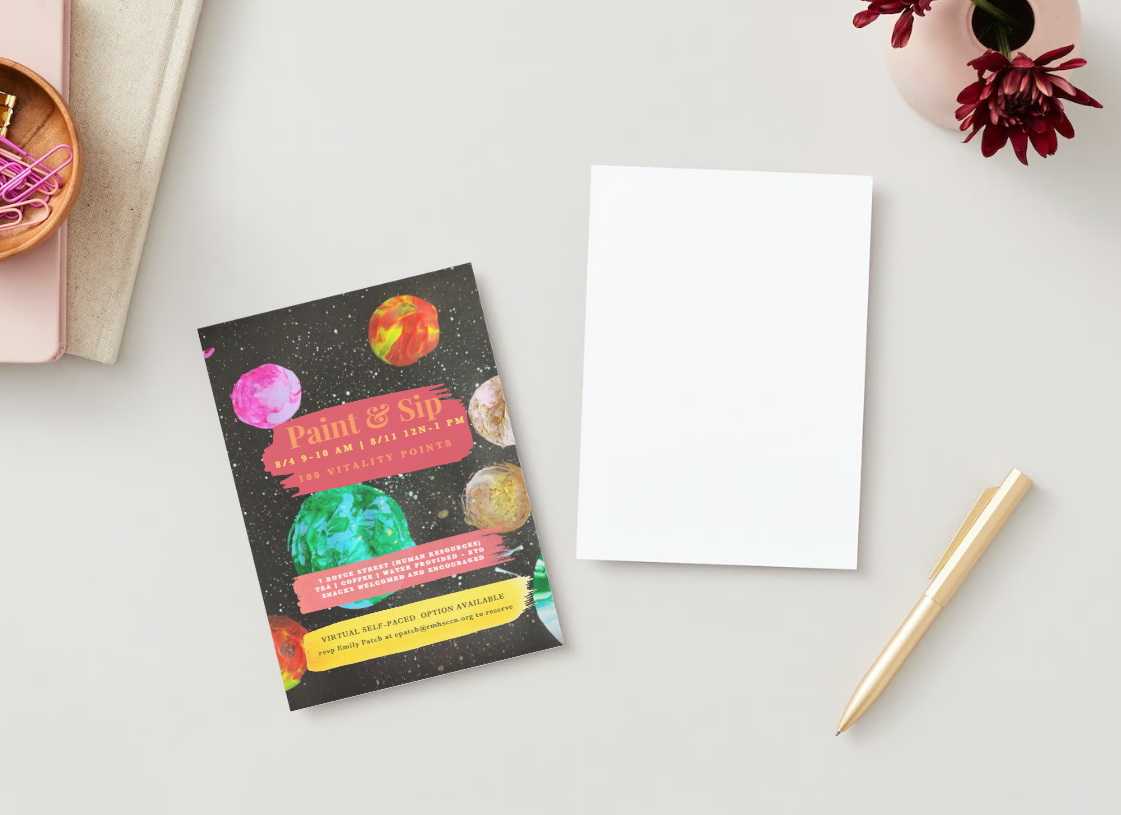
Look at that layout. Canva. It would have taken some time years ago - mocking up the invite, finding props, taking photos, developing film, scanning chromes (where are those white gloves?!) after choosing the right image on the light box of 20 or more shots and then sending them out to get printed. We then mounted them to foam core and used a burnisher to ensure there were no wrinkles or bubbles. I just clicked on this image when I was done in Canva and presented to the client. Can’t shake a stick at that, really.
It’s a tool. And I’m coming around to it. I used to work with a long-time creative who would scoff at such things and say, “it’s like a vending machine for design.” Well, yes. But you’ve got to move with the times. And keep your friends close, and your “enemies” closer, I believe.
I designed this invitation. I painted the background with gouache on black canvas and scanned it in - gave it a bit of a color pop. I laid out the text, made sure the information was succinct and that the spacing was pleasing to the eye. I popped what was important and used color to create energy.
But the brush stroke elements - they existed in Canva. That element would have taken some time with the old tools. Two seconds here. Seriously. It looks digital, but that’s ok. It is. It’s a digital representation of a classic medium. That’s cool. So, Canva. I’m coming around. A bit of elemental know-how goes a long way in a platform like this - without that it could go horribly awry. Too many fonts, graphics and what-not. No one to stop one from using white text on a yellow background - or blue on red. Yikes. But with the combination of experience and technology - you can do some really cool stuff.
Embrace the progress without pish-poshing the historical knowledge. That’s what happened here and why I’m coming around to Canva as a legitimate design tool.